Solutions · By role

For QA/QC managers: controls that hold, not paperwork that follows

Inspections with hold and witness points that alert the inspector when they fail, material rejections that raise their own NCR, NCRs the raiser can't close, and punch items closed only after verification.
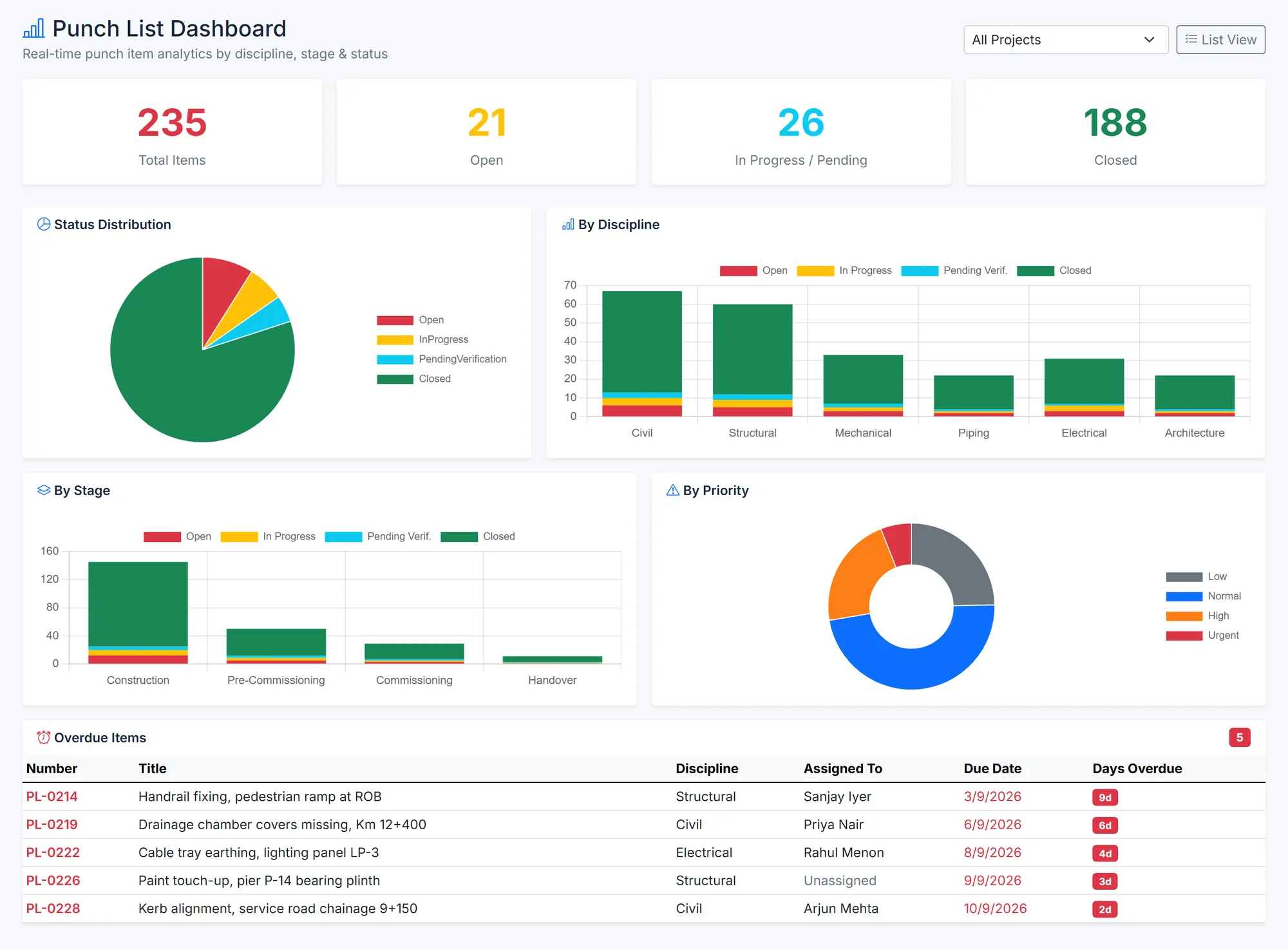
BuildCore punch list dashboard: totals open, in progress and closed; status pie; stacked bars by discipline and by stage; a priority doughnut; and overdue items with assignee and days overdue.
Punch items by status, discipline, stage and priority. Sample data.
Sound familiar?

What gets in the way

Hold points that don't hold

Work carries on past a failed hold point because nobody was told.

NCRs closed by the raiser

When the author can close their own NCR, 'closed' stops meaning 'fixed'.

Punch lists that never end

Items marked done but never checked come back at handover.

How BuildCore helps

What you'd use, and what it does

Quality (QC)

Inspections

  • 21 built-in checklists for work and materials
  • Hold, witness and review points; a failed hold point alerts the inspector
  • Geotagged photos and a printable ITR with signature blocks

More on Quality (QC) →

Quality (QC)

NCRs and materials

  • A rejected material raises a linked major NCR automatically
  • The raiser can't close an NCR; closed NCRs are locked
  • Observations escalated to NCRs in one step

More on Quality (QC) →

Quality (QC)

Punch and submittals

  • Punch items verified before they close, or sent back
  • Submittal decisions locked once final
  • Walkdowns that raise punch items as you go

More on Quality (QC) →

Project Close-Out

Close-out

  • Close-out checklist reads the punch list and NCRs live
  • Waivers recorded with a reason
  • As-built packages verified line by line

More on Project Close-Out →

In practice

From inspection to a verified close

1

Plan

Inspection from a built-in checklist.

2

Inspect

Lines marked, photos geotagged.

3

Alert

A failed hold point notifies the inspector.

4

Raise

A rejected material raises its NCR.

5

Close

Someone other than the raiser closes it.

6

Verify

Punch items checked before closing.

Questions

Common questions

The inspector raises it in one step. Automatic NCRs come from rejected materials — at site inspection, pre-dispatch or goods receipt.

Start from 21 built-in checklists and add lines per inspection; NCR, punch, observation and inspection form defaults are approved as templates.

Yes. Field Capture records NCRs offline and syncs them later.

See it on your project

A walkthrough shaped around your work

Tell us about your projects and we'll show you the parts of BuildCore that matter to you.