Product · Communications

Construction correspondence management, with every time bar in view

Register every contractual letter with its significance, its time bar and its response deadline. BuildCore highlights the ones running out, threads replies to the letters they answer and — when you ask — uses AI to score a letter's risk, summarise the chain and draft a reply. RFIs, minutes of meeting and actions sit on the same record.
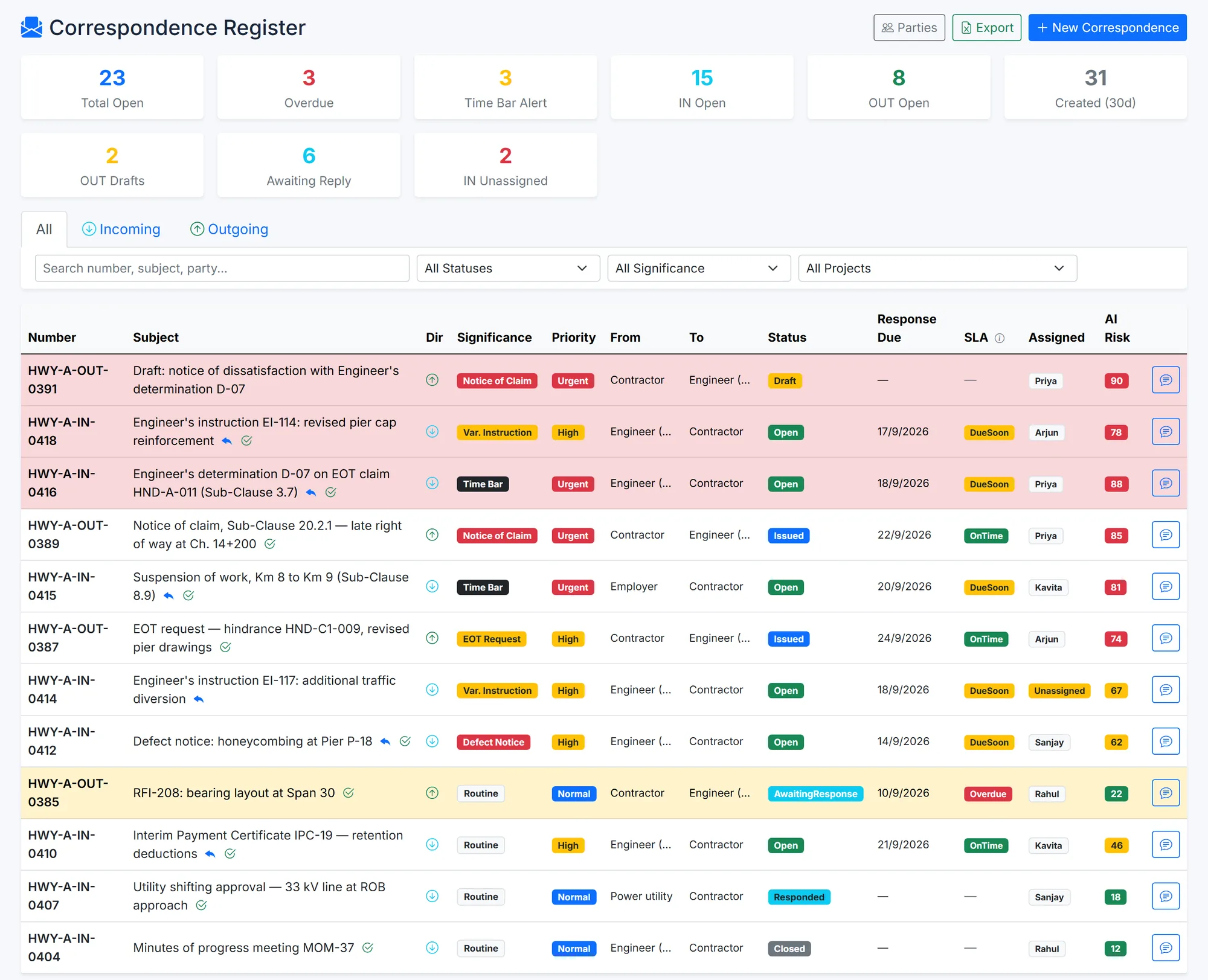
BuildCore's correspondence register: 23 open letters, 3 overdue and 3 time-bar alerts, with a table of letters showing contractual significance, priority, status, response due date, SLA, owner and AI risk score. Rows with a time bar inside seven days are highlighted red; an overdue reply is highlighted amber.
The correspondence register — time bars highlighted, contractual significance on every letter, AI risk scores where analysis has been run. Sample data.
Why it matters

Entitlement is lost in inboxes

Contract letters arrive by email, get forwarded, and sit. The contract keeps counting.

The notice nobody saw

A time-barred notice lost in a personal inbox can cost a claim that was otherwise sound.

Replies without a thread

When the answer isn't linked to the letter it answers, nobody can say which letters are still open.

Actions agreed, then forgotten

Meetings agree actions; without an owner, a due date and a reminder, they drift until the next dispute.

Capabilities

What Communications does

Correspondence register

  • Letters in and out, from draft to issued, awaiting response, responded and closed — reopened with a reason if needed
  • Contractual significance, contract clause and FIDIC sub-clause on each letter, linked to the contract, RFI, NCR, variation or vendor
  • The time bar recorded when a letter is registered, flagged Due Soon inside seven days and Overdue after
  • Threads: related letters, a linked response that stops the reply clock, CC list, assignment and acknowledgement
  • Response deadlines escalated in the app and by email, according to your SLA policy
  • Letters emailed with their attachment, and every send logged — failures included

AI, when you ask for it

  • Analyse a letter: classification, a risk score from 0 to 100 with its flags, the likely clause, suggested actions and a summary
  • Draft a reply into an editor for your team to change and issue — the AI never sends anything
  • Summarise a whole correspondence chain
  • Suggest whether a letter is a contractual notice and its time bar, for your team to confirm
  • Run on a local model on your own server, or on OpenAI, Anthropic or Google Gemini once an administrator enables it

RFIs

  • Open, answered, on hold, closed or withdrawn
  • Only the assigned person or a reviewer can post the official answer
  • Cost and time impact — days and amount — with an external respondent and an SLA
  • Overdue counts and a CSV export

Meetings and actions

  • Minutes from draft to published to confirmed — only the chair confirms — with external attendees and a structured agenda
  • Publishing notifies the distribution list and emails external attendees
  • One action register for actions from meetings, NCRs, inspections, observations, RFIs and HSE
  • Closing an action needs a remark; overdue owners are reminded every morning
  • Open actions from the last meeting carry forward into the next
How it works

A letter, from arrival to close

AI helps when you ask it to. People decide.

1

Register

Logged with its significance, time bar and response deadline.

2

Assign

An owner is assigned and acknowledges it.

3

Analyse

Optional: AI scores the risk and suggests the clause and actions.

4

Reply

Drafted — by your team or by AI for them to edit — and issued.

5

Link

The response is linked to the letter; the reply clock stops.

6

Close

Closed, with the thread and its audit trail intact.

Outputs

What comes out of it

  • Excel: the correspondence register, with time-bar, AI-risk and SLA columns
  • CSV: RFIs
  • Email: issued letters, published minutes, SLA escalations
  • Print: letter cover sheets and minutes, from the browser
Questions

Communications — common questions

No. The AI runs only when a user asks it to. It scores, summarises, suggests and drafts; your team edits and issues every reply, and nothing is sent on its say-so.

The time bar is recorded when the letter is registered. The register flags it Due Soon inside seven days and Overdue after the deadline, and the dashboard counts every letter on alert.

Yes. BuildCore can use a local model through Ollama on your own server. Cloud providers — OpenAI, Anthropic, Google Gemini — are optional and only process data once an administrator enables them.

Yes. Each RFI can carry an impact in days and in money, an external respondent and an SLA, and the register exports to CSV.

See it on your project

See Communications on your own project

Tell us about your project and we'll shape the demo around Communications and the modules it connects to.