Solutions · By role

For planning managers: from the P6 schedule to what gets done this week

Keep Primavera P6 as the schedule of record. BuildCore reads it for portfolio dashboards, imports it for look-aheads and weekly plans, and measures what actually gets done — PPC, the reasons tasks slip, and the constraints that stop a workfront.
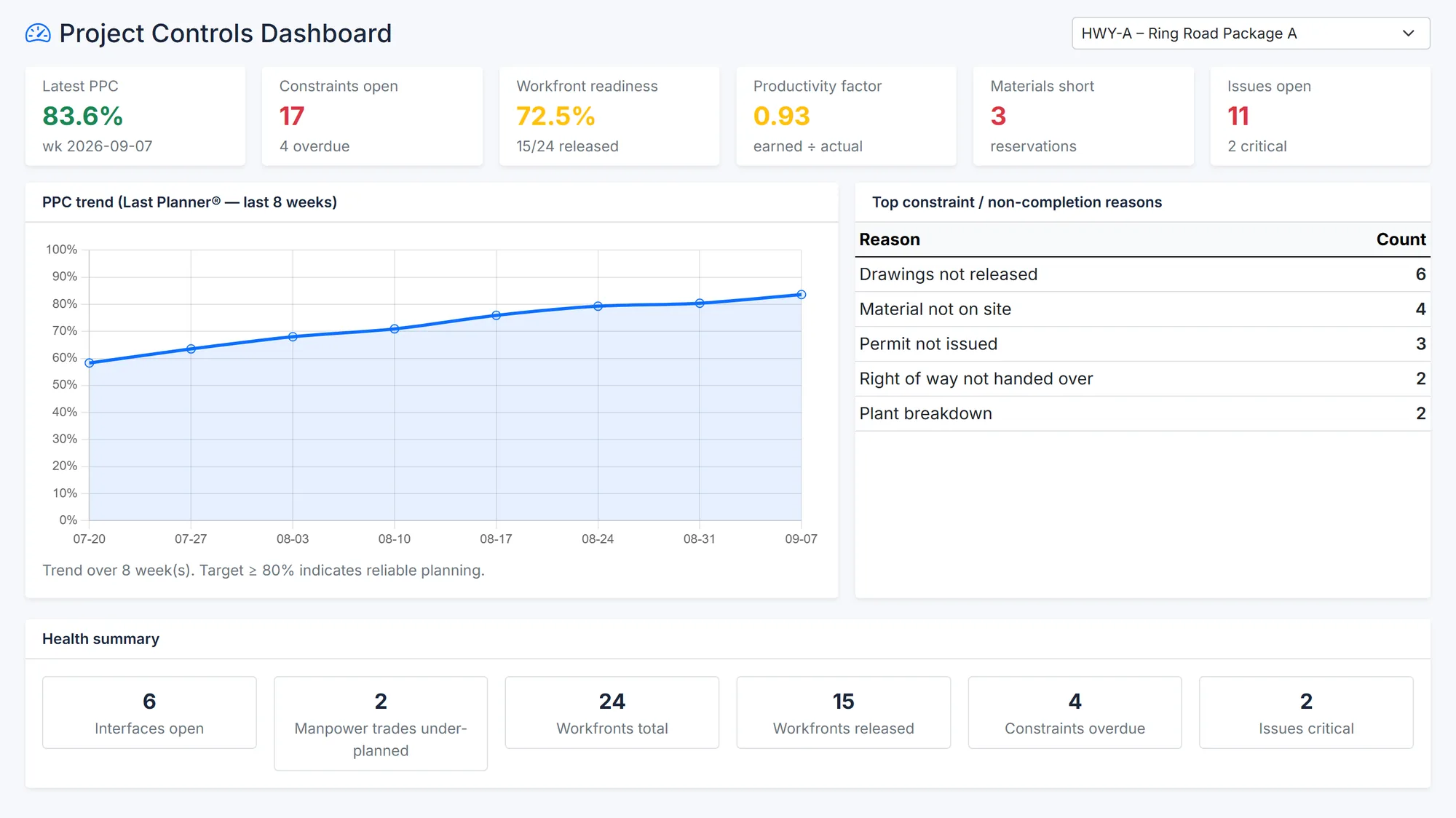
BuildCore project controls dashboard: latest PPC, open constraints, workfront readiness, productivity factor, materials short and open issues; an eight-week PPC trend; the top reasons tasks weren't completed; and a health summary.
PPC over eight weeks and the reasons behind missed tasks. Sample data.
Sound familiar?

What gets in the way

The schedule nobody looks at

A three-month programme doesn't tell a foreman what to finish this week.

Slippage explained after the fact

Without PPC and reasons, the same constraint stops work week after week.

Reporting instead of planning

Hours go into rebuilding S-curves and milestone lists by hand.

How BuildCore helps

What you'd use, and what it does

APM — Primavera P6

P6, read-only

  • Portfolio, health, milestone, variance and risk dashboards over your P6 data
  • BuildCore never writes to the schedule
  • P6 on Oracle? Use XER import instead

More on APM — Primavera P6 →

Construction PM

Last Planner

  • Look-ahead from the imported schedule
  • Weekly work plans with PPC and reasons for non-completion
  • Daily plans and daily PPC

More on Construction PM →

Construction PM

Constraints and workfronts

  • A constraint register you can close, reopen or turn into an issue
  • Workfront readiness checklists and scores, released with or without a waiver
  • Manpower, equipment and productivity against plan

More on Construction PM →

Construction PM

Progress from site

  • Daily progress reports with manpower by trade, approved and printed as PDFs
  • Late reports flagged
  • Earned value per measurement and a project S-curve

More on Construction PM →

In practice

A planning week

1

Import

The latest P6 schedule comes in as XER.

2

Look ahead

Pull the next three weeks' activities.

3

Commit

Weekly work plans agreed with the crews.

4

Clear

Constraints closed before the crew arrives.

5

Record

Daily plans and progress reports from site.

6

Learn

PPC and its reasons, trended.

Questions

Common questions

No. The live dashboards are read-only, and XER import brings a copy of the schedule into BuildCore's own module. P6 stays the schedule of record.

The live dashboards need a SQL Server-hosted P6 database. On Oracle, export XER files and import them into BuildCore's schedule module.

Yes. Each task closed as not completed carries its reason, and the reasons are trended alongside PPC.

See it on your project

A walkthrough shaped around your work

Tell us about your projects and we'll show you the parts of BuildCore that matter to you.