Product · Construction PM

Construction project controls, from the P6 schedule to the daily report

Import the schedule from Primavera P6, pull a look-ahead, commit weekly work plans and measure PPC. Record daily progress, clear constraints before they stop a workfront, and watch manpower, productivity and materials against plan.
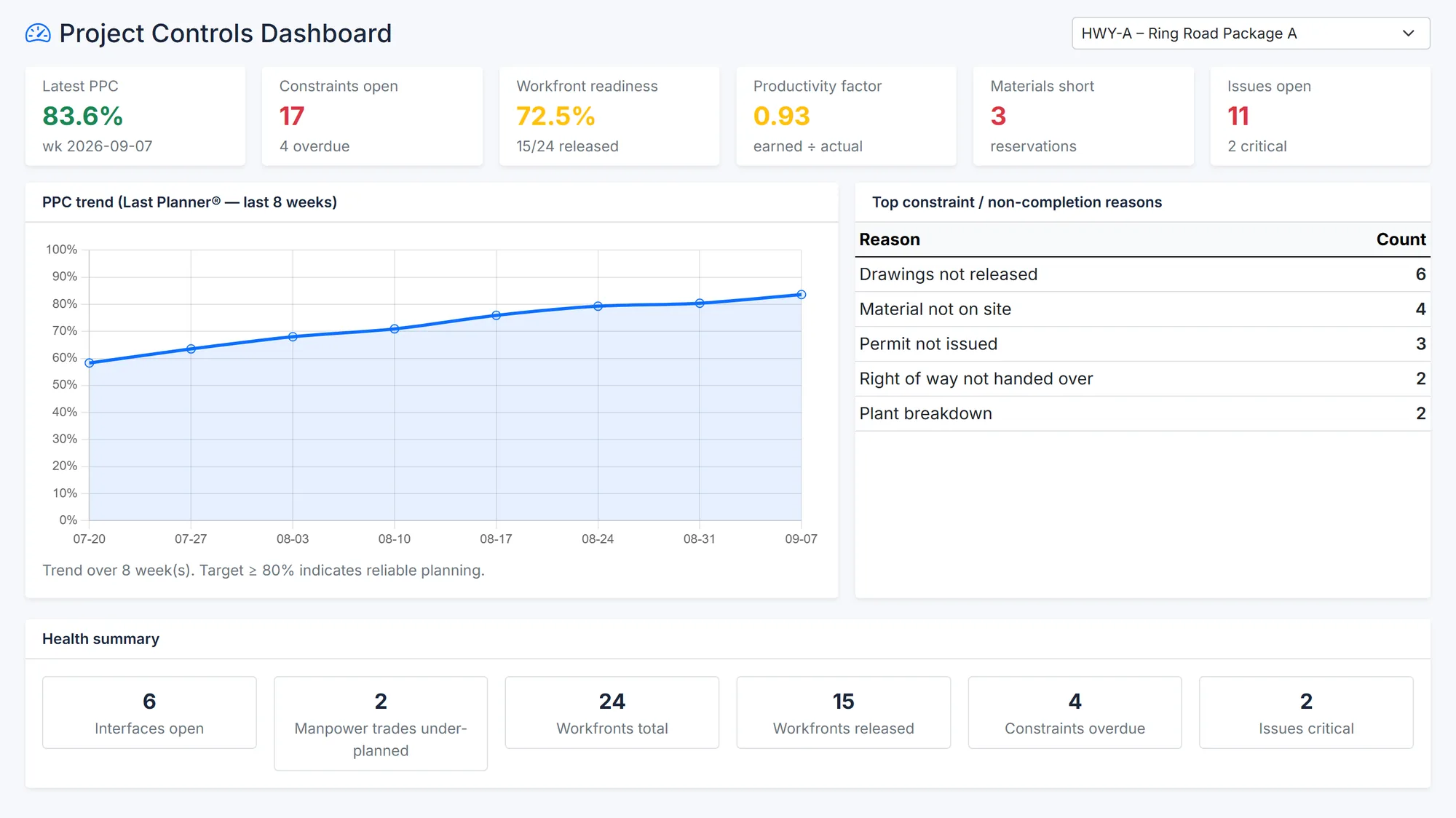
BuildCore's project controls dashboard for one project: latest PPC 83.6%, 17 constraints open (4 overdue), workfront readiness 72.5% with 15 of 24 released, productivity factor 0.93, 3 materials short and 11 issues open (2 critical); an eight-week PPC trend rising from about 58% to 84%; the top reasons tasks weren't completed; and a health summary.
PPC over eight weeks, the reasons behind missed tasks, and constraints, workfronts and productivity. Sample data.
Why it matters

The schedule says one thing. The site does another.

Most project-controls systems stop at the schedule. The slippage happens in the week between the plan and the work.

Plans nobody commits to

A three-month schedule doesn't tell a foreman what to finish this week — or ask why it wasn't.

Constraints found on the day

Missing drawings, materials and permits are discovered when the crew is already standing there.

Progress reports that don't add up

Daily reports on paper can't be totalled, trended or tied back to the schedule.

Capabilities

What Project Controls does

Schedule and WBS

  • A WBS tree with weight validation and Excel import, and work packages beneath it
  • Primavera P6 schedules imported and exported as XER files
  • A look-ahead window you set (three weeks by default) and the critical path from the P6 schedule
  • Activity progress updates, earned value per measurement and a project S-curve

Last Planner

  • Look-ahead generation and weekly work plans
  • PPC by week, with reasons for non-completion and their trend
  • Unfinished work carried forward
  • Daily plans generated from the weekly plan, with a daily PPC

Daily progress

  • One daily progress report per site per day, with manpower by trade — own staff and subcontractors
  • Draft, submitted, approved or rejected — with a PDF
  • A late-report check, cumulative manpower, and materials pulled in from goods receipts
  • A method statement register with submission and review

Constraints, workfronts and resources

  • A constraint register — close, reopen or convert to an issue — with a CSV export
  • Workfronts with a readiness checklist and score, released or released with a waiver
  • Manpower plans with histogram and S-curve, equipment plan against actual, productivity norms and trend
  • Material reservations, shortages and quantity reconciliation from progress
  • Issue, interface and re-baseline registers, and a controls dashboard with an eight-week PPC chart
How it works

From the P6 schedule to this week's work

1

Import

Bring the schedule in from Primavera P6 as an XER file.

2

Look ahead

Pull the next weeks' activities into a look-ahead.

3

Commit

Agree the weekly work plan with the people doing it.

4

Record

Daily plans and daily progress reports from site.

5

Close

Tasks closed — or not, with the reason why.

6

Learn

PPC and its reasons trended on the controls dashboard.

Outputs

What comes out of it

  • PDF: daily progress report
  • XER: schedule export to Primavera P6
  • CSV: constraints, weekly plans, look-ahead, issues, interfaces and quantities
Questions

Construction PM — common questions

Yes, for scheduling. BuildCore imports the P6 schedule as an XER file, works from its critical path, and exports back to XER; planning stays in P6.

Percent Plan Complete — the share of committed weekly tasks actually finished. BuildCore tracks it by week and by day, with the reasons for anything not completed.

Yes. Each site submits one report per day, with manpower by trade, for approval; approved reports print as PDFs, and late reports are flagged.

See it on your project

See Construction PM on your own project

Tell us about your project and we'll shape the demo around Construction PM and the modules it connects to.