Solutions · By role

For document controllers: one register, every revision, every acknowledgement

BuildCore codes revisions for you, routes reviews through your IDC matrix, and issues approved documents by transmittal — with acknowledgement deadlines, overdue reminders and C1–C4 responses captured, even from recipients without a login.
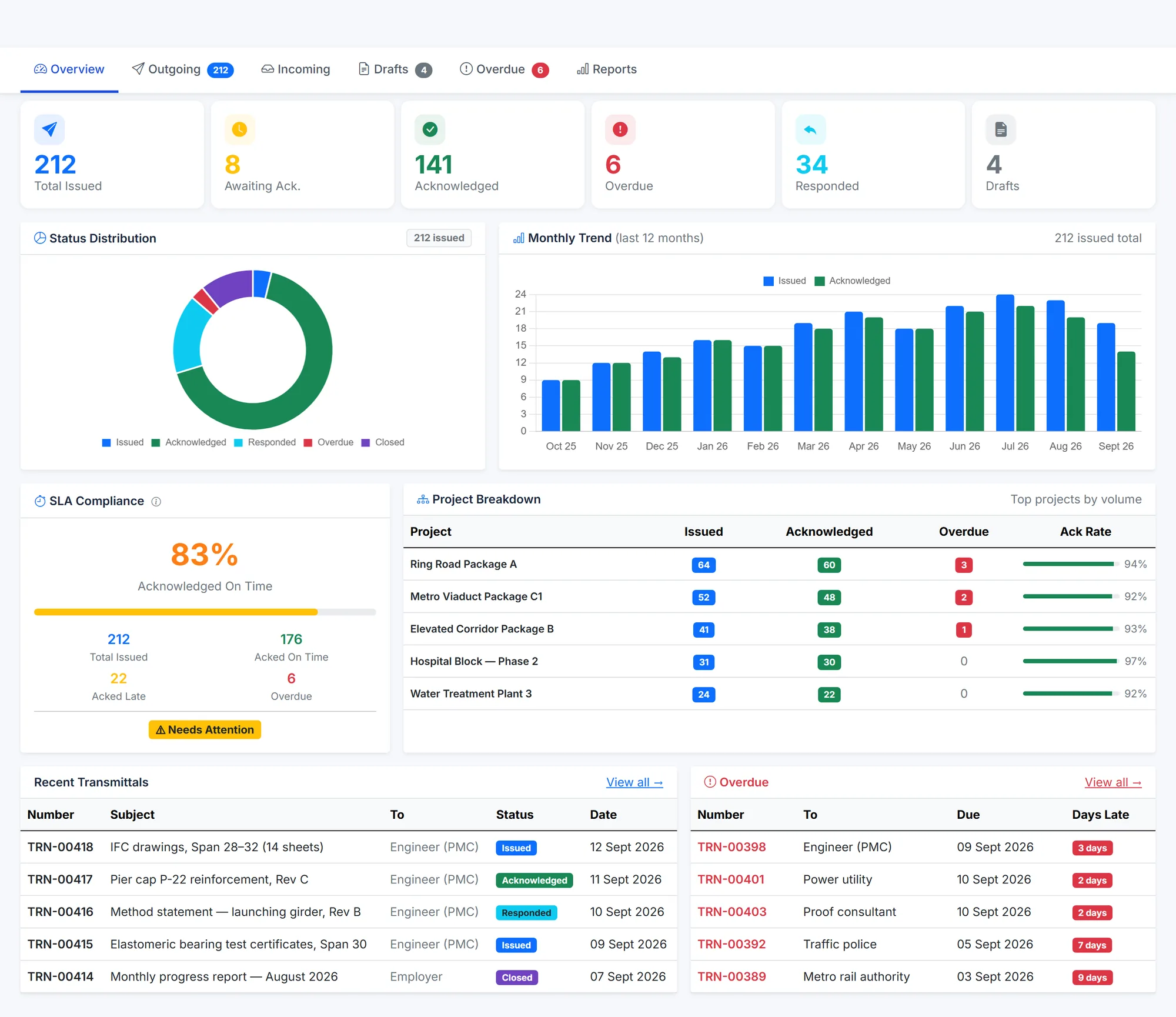
BuildCore transmittals overview: transmittals issued, awaiting acknowledgement, acknowledged, overdue, responded and draft; a status doughnut; a 12-month trend; an SLA card for acknowledgements on time; acknowledgement rates by project; and recent and overdue transmittals.
Transmittals — acknowledgement SLA, overdue items and the monthly trend. Sample data.
Sound familiar?

What gets in the way

Chasing acknowledgements

A transmittal isn't done until the other side confirms receipt — and chasing that takes days.

Revision codes by hand

Manual coding invites the duplicate and the skipped revision.

Reviews lost in inboxes

Comments come back by email, in different formats, from people who weren't on the list.

How BuildCore helps

What you'd use, and what it does

Document Management

The register

  • Revision codes assigned automatically by issue purpose
  • Duplicate files rejected by fingerprint
  • Bulk import from CSV and ZIP to bring your register across

More on Document Management →

Document Management

Review workflows

  • Ordered or parallel steps, each with a due date
  • Reviewers assigned from the IDC matrix
  • Revision compare exported to Excel

More on Document Management →

Document Management

Transmittals

  • Acknowledgement due dates, overdue marking and reminder emails
  • C1–C4 responses, with comments or resubmission dates enforced
  • An expiring link for recipients without a login

More on Document Management →

Document Management

Control

  • Permissions per document, with expiry
  • Controlled-copy watermark on approved downloads
  • Sealed packages shared by revocable link

More on Document Management →

In practice

A drawing, from upload to closed transmittal

1

Upload

Coded and checked.

2

Review

Routed to the IDC reviewers.

3

Approve

Marked Approved when every step passes.

4

Issue

Sent by transmittal with the cover PDF.

5

Acknowledge

Confirmed by link, or chased automatically.

6

Respond

C1–C4 recorded, then closed.

Questions

Common questions

Yes — through an expiring link, 30 days by default, to acknowledge and respond with a C1–C4 code.

It searches numbers, titles and fields, not the text inside files.

Yes. Bulk import takes a CSV of the register plus an optional ZIP of files.

See it on your project

A walkthrough shaped around your work

Tell us about your projects and we'll show you the parts of BuildCore that matter to you.