Product · Procurement

Construction procurement, from requisition to goods receipt

Raise requisitions, invite only prequalified vendors, and keep bids sealed until each evaluator has declared any conflict of interest. Award against a minimum number of bids, issue budget-checked purchase orders, and receive goods with an inspection sign-off — a rejection raises an NCR.
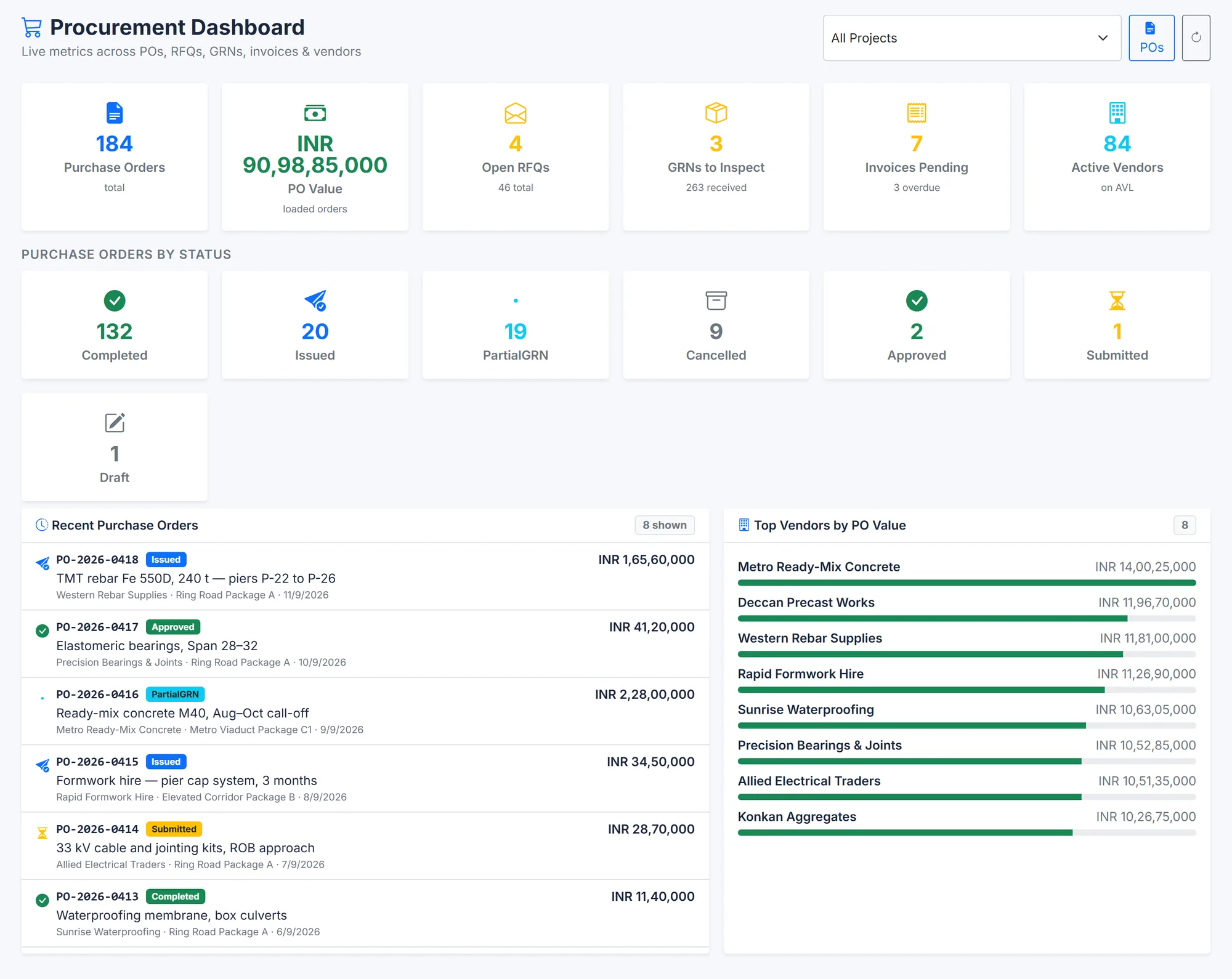
BuildCore's Procurement dashboard: 184 purchase orders worth about 91 crore rupees, 4 open RFQs, 3 goods receipts awaiting inspection, 7 invoices pending (3 overdue) and 84 active vendors; purchase orders by status; the most recent orders with vendor, project and value; and the top vendors by order value.
Orders, RFQs, receipts awaiting inspection and invoices — with the top vendors by value. Sample data.
Why it matters

Procurement risk hides in the paperwork

Most procurement problems are visible afterwards and invisible at the time.

Quotes compared in email

Bids that anyone can see before evaluation invite questions nobody wants to answer later.

Orders that overrun the budget

An order approved without checking the budget line is found out about at invoice.

Rejected material, paid for anyway

A rejection at the gate that never reaches quality or accounts gets paid for — and sometimes used.

Capabilities

What Procurement does

Requisition and RFQ

  • Material and service requisitions through a configurable approval workflow
  • RFQs raised from a requisition, with line items, procurement method and a minimum number of bids — three by default
  • Only active vendors on the approved vendor list, with approved prequalification, can be invited

Bids and award

  • Bids stay sealed until the evaluator files a conflict-of-interest declaration
  • Tabulation of value, technical score, commercial score and late bids
  • Clarifications and best-and-final offers
  • Evaluation approved through its own workflow; award enforces the minimum bid count

Vendors

  • Prequalification with weighted sections, granting approved-vendor status with an expiry date
  • Vendor documents verified, with expiry alerts
  • Scorecards graded A to F: delivery 30%, quality 40%, invoice match 20%, pricing 10%

Order, receive, pay

  • Purchase orders under a set value approve themselves; the rest go through the approval workflow
  • Issuing reserves budget; amendments and cancellations re-check or release it
  • Goods receipt blocks over-receiving, splits accepted and rejected quantities, and needs a signed-off inspection before acceptance
  • A rejection at receipt raises an NCR; accepted goods go into stores, and capital items to capital work in progress
  • Vendor invoices matched three ways against the order and the receipt, within tolerances you set
  • Landed cost, debit notes, and subcontract bills with retention, advance, back-charge and LD deductions
How it works

From requisition to a matched invoice

1

Requisition

Raised and approved.

2

RFQ

Issued to prequalified vendors only.

3

Evaluate

Bids opened after conflict-of-interest declarations.

4

Order

Awarded and issued, with the budget reserved.

5

Receive

Inspected; rejections raise an NCR.

6

Pay

The invoice is matched to the order and the receipt.

Outputs

What comes out of it

  • Purchase orders, RFQs, goods receipts, invoices, debit notes and subcontract bills printed from the browser
Questions

Procurement — common questions

Bid values and scores stay hidden from each evaluator until they have filed a conflict-of-interest declaration for that RFQ.

Yes. Only active vendors on the approved vendor list, with an approved prequalification, can be invited to an RFQ.

On delivery (30%), quality (40%), invoice match (20%) and pricing (10%), graded from A to F.

The rejected quantity is recorded against the order line and an NCR is raised automatically; only accepted goods go into stores.

See it on your project

See Procurement on your own project

Tell us about your project and we'll shape the demo around Procurement and the modules it connects to.