Solutions · By role

For project directors: the true position, without waiting for the report

BuildCore puts each person's open work, the project's alerts and every module's figures on one screen, read straight from the record. You see what's overdue, what's at risk and who has it — today, not at the month-end review.
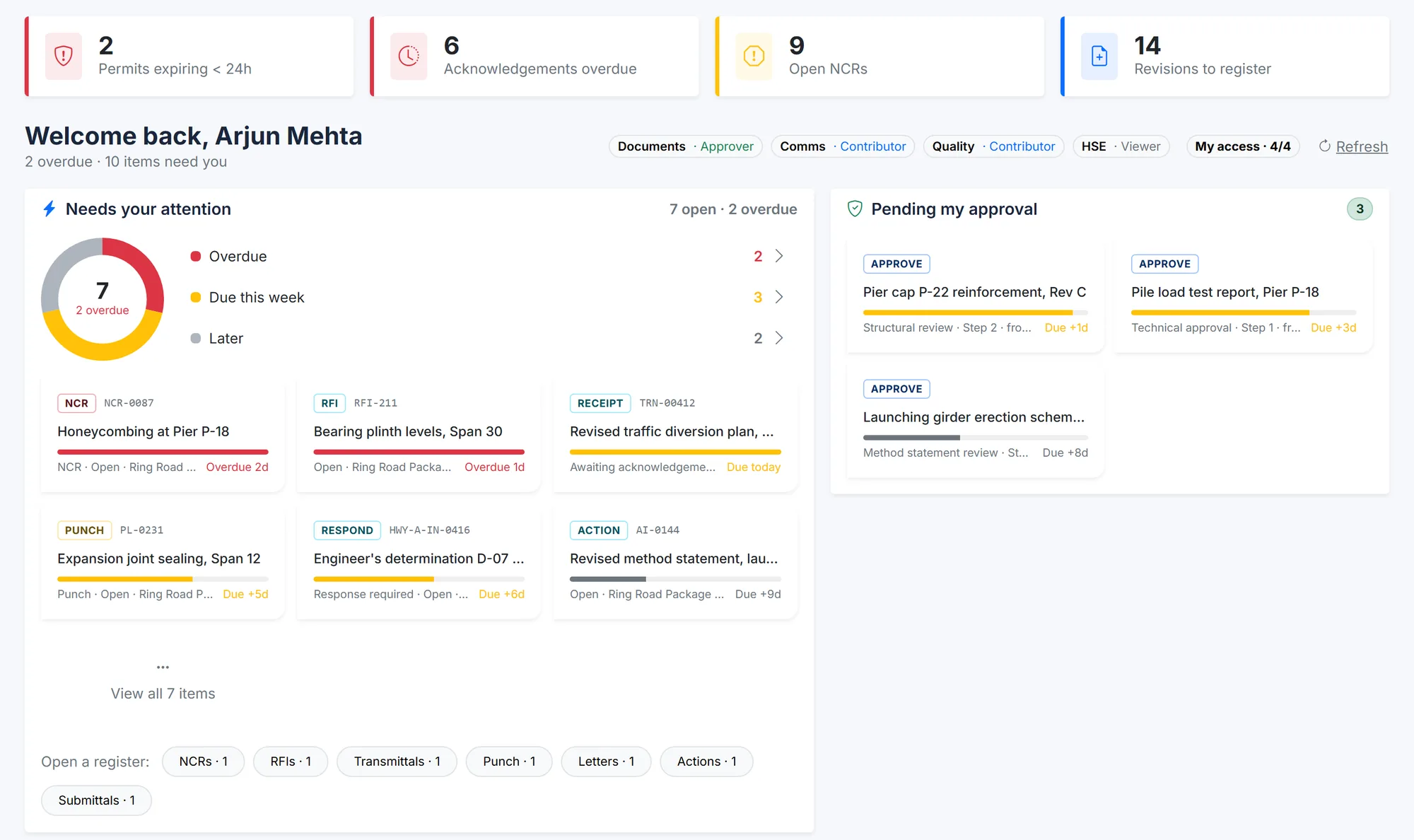
BuildCore home screen: alert tiles for permits expiring, overdue acknowledgements, open NCRs and revisions to register; a 'Needs your attention' list across NCRs, RFIs, transmittals, punch items, letters and actions, most urgent first; and documents pending approval.
The home screen — alerts and open work across every module, most urgent first. Sample data.
Sound familiar?

What gets in the way

Reports that are already old

By the time the monthly report is compiled, the numbers in it are three weeks behind the site.

Every team, a different version

Schedule, cost, quality and safety each have their own spreadsheet — and their own truth.

Risk you hear about late

A time-barred notice or an overdue NCR reaches you when it's already a problem.

How BuildCore helps

What you'd use, and what it does

Communications

Open work across every module

  • One list of what's overdue and due this week — NCRs, RFIs, transmittals, punch items, letters and actions
  • Alerts for permits expiring, overdue acknowledgements and open NCRs
  • People see only the modules and projects their role allows

More on Communications →

Hindrance & EOT

The contract position

  • Hindrance clocks on both sides, with EOT days claimed, granted and pending
  • Liquidated-damages exposure at risk
  • FIDIC claims flagged the day a notice deadline passes

More on Hindrance & EOT →

APM — Primavera P6

The schedule, from P6

  • Portfolio dashboards over a SQL Server-hosted P6 database, read-only
  • Critical, delayed and on-track projects by programme
  • Milestones due in the next 7, 30 and 90 days

More on APM — Primavera P6 →

Commercial & Finance

The money, line by line

  • Budget lines from committed to accrued to actual
  • A purchase order blocked when its budget line can't cover it
  • Earned value, variance and project P&L from the same record

More on Commercial & Finance →

In practice

A Monday morning with BuildCore

1

Open

The home screen shows what's overdue across every module.

2

Contract

Check the hindrance clocks and the EOT position.

3

Schedule

Review delayed P6 projects and the milestones due this month.

4

Quality & safety

Open NCRs, permits expiring and the incident trend.

5

Money

Committed against budget, line by line.

6

Act

Every figure opens the register behind it.

Questions

Common questions

No. BuildCore is modular, and the P6 dashboards read your schedule where it already lives. Start with the modules that fill your biggest gap and add others later.

Yes. Access is set by role and project, so the home screen and every dashboard show each person only what they're allowed to see.

Live. The figures are read from the project record when you open the screen.

See it on your project

A walkthrough shaped around your work

Tell us about your projects and we'll show you the parts of BuildCore that matter to you.